ธีม
When your work depends on other work
The most common question after a first pull request: my change needs another change that is still being reviewed — do I have to wait?
No. There are two ways round it, and the first one is much simpler than people expect.
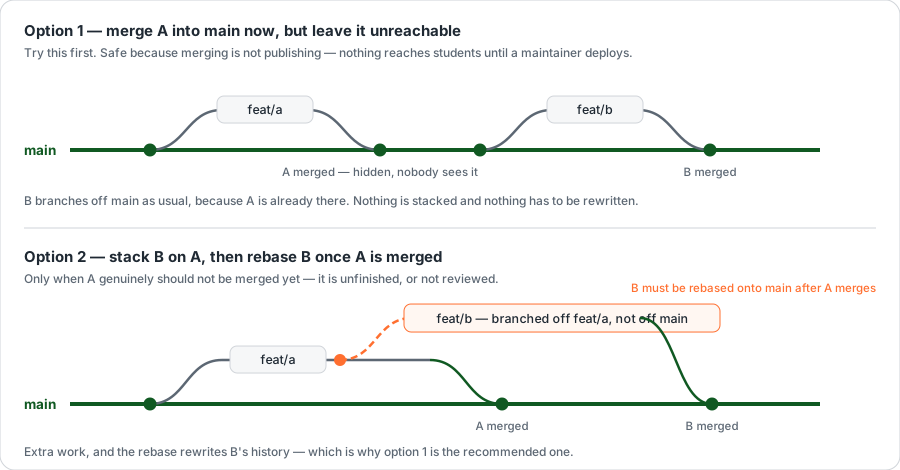
Throughout this page, A is the change that has to happen first, and B is yours, which needs it.
Option 1 — merge A now, but leave it unreachable
Try this first.
Merge A into main straight away, but make sure nothing leads to it: no link in the menu, or hidden behind a permission nobody has been given yet. B then branches off main like any other change, because what it needs is already there.
Nothing is stacked. Nothing has to be rewritten later. B is an ordinary pull request.
Why this is safe, and not a shortcut
Merging into main does not publish anything. Work sitting in main reaches nobody until a maintainer connects to the VPN and deploys — see Your first change, step 8.
So "merged but unreachable" is genuinely two locks: it is not deployed, and even once it is, nothing on the page leads to it. This is how the ฝ่าย pages and several other features landed — merged in pieces over days, switched on at the end.
Option 2 — stack B on A
Use this only when A genuinely should not be merged yet: it is unfinished, or it has not been reviewed and you do not want it in main on your say-so.
Branch off A instead of off main:
bash
git checkout feat/a          # stand on the branch that is waiting
git checkout -b feat/b       # branch off A, not off main
When you open B's pull request, change its base branch to feat/a. There is an Edit button beside the pull request title on GitHub; the base is the dropdown that appears.
Do not skip changing the base
If B's base stays main, the pull request shows A's changes and B's mixed together, and a reviewer cannot tell which is which — so neither gets reviewed. With the base set to feat/a, B's pull request shows only what B added.
Once A is merged into main, move B across:
bash
git checkout main && git pull origin main
git checkout feat/b
git rebase --onto main feat/a feat/b
git push --force-with-lease
That last block reads as: take the commits that are on feat/b but not on feat/a, and replay them on top of the current main. B's commits get new identities, which is why the push has to be forced.
--force-with-lease, never plain --force
--force-with-lease refuses if somebody else pushed to the branch while you were working — it checks before it overwrites. Plain --force overwrites regardless and can destroy a colleague's commits.
Only ever force-push a branch that is yours. Never main.
Then set B's base back to main. GitHub usually does this for you the moment A is merged.
What not to do
Do not keep piling commits into one branch while you wait for A. It feels productive and it is the slowest option available. The longer a branch lives, the more it collides with everything merged in the meantime, and a pull request too large to read does not get reviewed — it gets postponed.
If your work is genuinely two things, it is two pull requests. Split it and use option 1.
Next — Troubleshooting